import numpy as np
import matplotlib.pyplot as plt
import astroapers as aap
import pandas as pdMultiple apertures and radial profiles
This notebook shows how to measure several source positions at once, check edge coverage, and use multiple radii to build a simple radial profile.
Several apertures at once
ny, nx = 70, 80
y, x = np.mgrid[:ny, :nx]
positions = np.array(
    [
        [20.0, 24.0],
        [40.5, 35.2],
        [78.0, 68.0],
    ],
)

data = np.full((ny, nx), 5.0)
for x0, y0 in positions:
    data += 80.0 * np.exp(-0.5 * ((x - x0) ** 2 + (y - y0) ** 2) / 2.5**2)
# multiple apertures at once:
ap = aap.CircAp(positions, r=5.0)
# all at once:
apsum, npix = ap.apsum_exact(data)
coverage = npix / ap.area
assert coverage[-1] < 1.0
pd.DataFrame({
"x": positions[:, 0],
"y": positions[:, 1],
"apsum": apsum,
"npix": npix,
"coverage": coverage
})| x | y | apsum | npix | coverage | |
|---|---|---|---|---|---|
| 0 | 20.0 | 24.0 | 3095.883704 | 78.539816 | 1.000000 |
| 1 | 40.5 | 35.2 | 3098.910513 | 78.539816 | 1.000000 |
| 2 | 78.0 | 68.0 | 1697.748072 | 36.656814 | 0.466729 |
The third source is near the image edge, so its in-frame coverage is smaller.
The aperture owns a read-only copy of positions: later edits to this input array do not change ap, and ap.positions cannot be edited or reassigned. Reuse ap for other images with the same centers and radius. For shifted centers, construct a new aperture, for example shifted_ap = aap.CircAp(ap.positions + (0.5, 0.0), r=ap.r). This ownership rule also applies with validate=False; see construction and repeated measurements.
Construction can be roughly twice as fast with validate=False for already valid inputs, but it already takes microseconds in local CircAp measurements (1.66 µs → 0.75 µs for one center). Gains vary with layout and batch size; keep validation enabled here and measure your full workflow before opting out.
fig, ax = plt.subplots(figsize=(5, 4))
ax.imshow(data, origin="lower", cmap="viridis")
ap.plot(ax=ax, color="r", lw=2)
ax.set_title("Multiple circular apertures")
plt.show()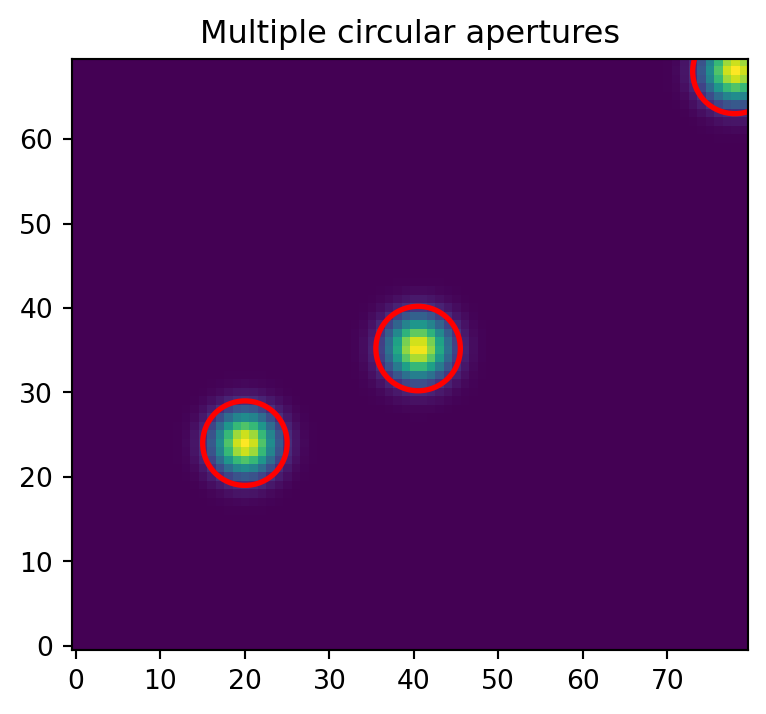
Multiple radii for radial profiles
Use one vector aperture per radius to measure the same source catalog at several scales. The examples below use the two in-frame sources; the edge source is excluded so the radial profile is not dominated by image clipping.
# drop objects with low coverage:
edgemask = npix < ap.area

profile_positions = positions[~edgemask]
radii = np.arange(1.0, 10.0, 1.0)

cumulative = []
for radius in radii:
    ap_r = aap.CircAp(profile_positions, r=radius)
    ap_r_sum, ap_r_npix = ap_r.apsum_exact(data)
    cumulative.append((ap_r_sum, ap_r_npix))

cumulative_apsum = np.vstack([row[0] for row in cumulative])
cumulative_npix = np.vstack([row[1] for row in cumulative])

pd.DataFrame(
    cumulative_apsum,
    index=pd.Index(radii, name="radius"),
    columns=[f"source {idx}" for idx in range(len(profile_positions))],
)| source 0 | source 1 | |
|---|---|---|
| radius | ||
| 1.0 | 252.073757 | 255.234593 |
| 2.0 | 909.846200 | 915.437406 |
| 3.0 | 1734.940312 | 1741.407368 |
| 4.0 | 2501.349863 | 2506.335847 |
| 5.0 | 3095.883704 | 3098.910513 |
| 6.0 | 3522.928796 | 3524.545542 |
| 7.0 | 3845.326896 | 3845.881803 |
| 8.0 | 4126.672944 | 4126.909342 |
| 9.0 | 4408.660903 | 4408.716454 |
Draw the same radii on the image:
fig, ax = plt.subplots(figsize=(5, 4))
ax.imshow(data, origin="lower", cmap="viridis")
for radius in radii:
    aap.CircAp(profile_positions, r=radius).plot(
        ax=ax,
        color="tab:red",
        alpha=0.35,
        lw=1.2,
    )
ax.scatter(profile_positions[:, 0], profile_positions[:, 1], c="white", s=12)
ax.set_title("Multiple radii at each source")
plt.show()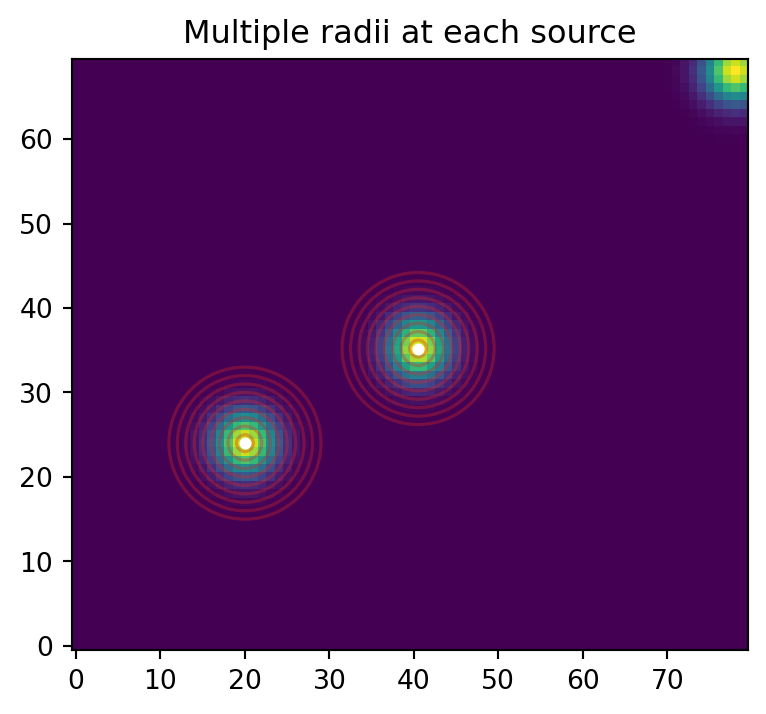
For custom pixel-sample statistics such as a sigma-clipped median, or robust scatter, each aperture returns a different number of raw image values. That result is ragged, so a Python reduction over the returned arrays is expected. Keep the aperture construction vectorized over source positions, and use the length of each returned sample array as the center-selected pixel count. Use weights_center() instead when you need the bbox-tight binary weights themselves.
radius_edges = np.arange(0.0, 10.0, 1.0)
radius_mid = 0.5 * (radius_edges[:-1] + radius_edges[1:])

custom_rows = []
for r_in, r_out, r_mid in zip(radius_edges[:-1], radius_edges[1:], radius_mid):
    an = aap.CircAn(profile_positions, r_in=r_in, r_out=r_out)
    an_vals = an.sampled_values(data)

    # For raw center-selected samples, npix is just the number of values used here.
    # For complicated calculations, user may store npix before/after sigclip
    # such as npix and nrej.

    for source_idx, ((x0, y0), vals) in enumerate(zip(profile_positions, an_vals)):
        custom_rows.append(
            {
                "radius": r_mid,
                "source": source_idx,
                "x": x0,
                "y": y0,
                "mpix": np.nanmedian(vals),
                "spix": np.nanstd(vals, ddof=1),
                "npix": len(vals),
            }
        )

custom_profile = pd.DataFrame(custom_rows).set_index(["radius", "source"])
custom_profile| x | y | mpix | spix | npix | ||
|---|---|---|---|---|---|---|
| radius | source | |||||
| 0.5 | 0 | 20.0 | 24.0 | 85.000000 | NaN | 1 |
| 1 | 40.5 | 35.2 | 81.333707 | 2.115016 | 4 | |
| 1.5 | 0 | 20.0 | 24.0 | 76.010405 | 3.034914 | 8 |
| 1 | 40.5 | 35.2 | 68.486459 | 4.045531 | 10 | |
| 2.5 | 0 | 20.0 | 24.0 | 58.625604 | 6.081807 | 16 |
| 1 | 40.5 | 35.2 | 51.100631 | 4.026071 | 14 | |
| 3.5 | 0 | 20.0 | 24.0 | 40.946317 | 4.498758 | 20 |
| 1 | 40.5 | 35.2 | 34.453909 | 4.594058 | 22 | |
| 4.5 | 0 | 20.0 | 24.0 | 24.743541 | 2.336489 | 24 |
| 1 | 40.5 | 35.2 | 20.532811 | 3.229756 | 28 | |
| 5.5 | 0 | 20.0 | 24.0 | 13.928152 | 2.213032 | 40 |
| 1 | 40.5 | 35.2 | 11.978449 | 1.912151 | 38 | |
| 6.5 | 0 | 20.0 | 24.0 | 8.260976 | 0.792907 | 36 |
| 1 | 40.5 | 35.2 | 7.466881 | 0.713340 | 40 | |
| 7.5 | 0 | 20.0 | 24.0 | 6.200606 | 0.342251 | 48 |
| 1 | 40.5 | 35.2 | 5.831067 | 0.276280 | 44 | |
| 8.5 | 0 | 20.0 | 24.0 | 5.299624 | 0.119430 | 56 |
| 1 | 40.5 | 35.2 | 5.232901 | 0.106322 | 56 |
For high-throughput grouped statistics, flat=True returns the same ragged samples as one concatenated array plus integer offsets. Aperture i is flat_values[offsets[i]:offsets[i + 1]], and np.split() reconstructs the default list result.
flat_values, offsets = an.sampled_values(data, flat=True)
assert all(
    np.array_equal(got, want)
    for got, want in zip(np.split(flat_values, offsets[1:-1]), an_vals)
)

flat_values.shape, offsets.shape
((112,), (3,))fig, ax = plt.subplots(figsize=(5, 3.5))
for source_idx, source_profile in custom_profile.groupby(level="source"):
x0 = source_profile["x"].iloc[0]
y0 = source_profile["y"].iloc[0]
# Median surface brightness (divide by area), normalized by the central annulus:
sample_npix = source_profile["npix"]
surf_b = source_profile["mpix"] / sample_npix
center = surf_b.iloc[0]
surf_b = surf_b / center
spix_surfb = source_profile["spix"] / center / sample_npix
ax.errorbar(
source_profile.index.get_level_values("radius"),
surf_b,
yerr=spix_surfb,
marker=".",
label=f"({x0:.1f}, {y0:.1f})",
)
ax.legend(title="source")
ax.set(
xlabel="radius (pixels)",
ylabel="Surface brightness (normalized)",
yscale="log",
)
plt.show()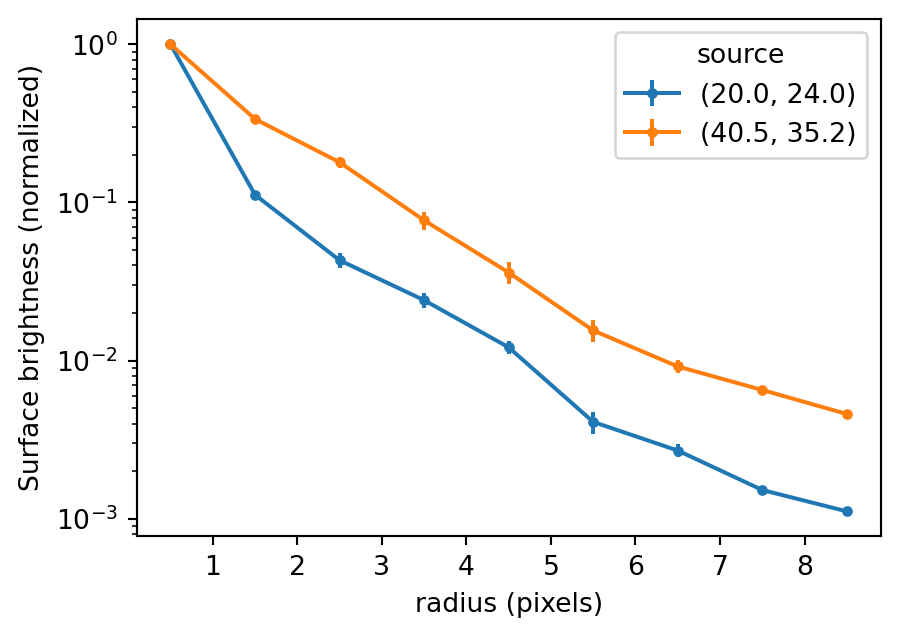
Weights and boxes return lists
weights_exact() and bboxes() each return one item per vector position, even when the aperture is scalar. Match them by index when clipping or reusing bbox-tight weights.
weights = ap.weights_center()
boxes = ap.bboxes()
assert len(weights) == len(positions)
[weight.sum() for weight in weights]
[np.float64(69.0), np.float64(78.0), np.float64(69.0)]full_masks = [
box.to_image(weight, data.shape) > 0
for weight, box in zip(weights, boxes, strict=True)
]
[mask.sum() for mask in full_masks][np.int64(69), np.int64(78), np.int64(33)]Maximum Performance
For catalog arrays, import the raw Rust extension as aapr. Keep x, y, and data C-contiguous, and pass geometry as positional arguments. For more examples of raw call patterns, inspect astroapers.kernels.
import astroapers._rust as aapr

raw_data = np.ascontiguousarray(data, dtype=np.float64)
xpos = np.ascontiguousarray(positions[:, 0], dtype=np.float64)
ypos = np.ascontiguousarray(positions[:, 1], dtype=np.float64)

raw_apsum, raw_npix = aapr.apsum_circ_exact(raw_data, xpos, ypos, 5.0)
raw_sum_only = aapr.apsum_circ_exact_sum(raw_data, xpos, ypos, 5.0)

assert np.allclose(raw_apsum, apsum)
assert np.allclose(raw_npix, npix)
assert np.allclose(raw_sum_only, apsum)

np.column_stack([positions, raw_apsum, raw_npix, np.asarray(raw_npix) / ap.area])
array([[2.00000000e+01, 2.40000000e+01, 3.09588370e+03, 7.85398163e+01,
1.00000000e+00],
[4.05000000e+01, 3.52000000e+01, 3.09891051e+03, 7.85398163e+01,
1.00000000e+00],
[7.80000000e+01, 6.80000000e+01, 1.69774807e+03, 3.66568144e+01,
4.66729057e-01]])