import numpy as np
import matplotlib.pyplot as plt
import astroapers as aapBbox-tight weights
PixelAp.weights_exact() is the fractional-overlap sampled result of an aperture: one small bbox-tight weight image per aperture position. PixelAp.bboxes() returns the matching BoundingBox objects that place those weights in the parent image. Both methods always return lists, even for scalar apertures.
Keep three ideas separate:
ap.areais the analytic geometric area of the aperture (e.g., \(\pi r^2\) for a circle).ap.npix_exact(shape, mask=...)is the sum of weights, excluding pixels outside the image and/or masked pixels (therefore, \(\le\)ap.area).weights[i]are “fraction of area for each pixel that is inside the aperture”. To save memory, they arebbox-tight, so to get the full image-shaped mask, useboxes[i].to_image(weights[i], shape).
Exact and Center Masks
weights_exact(): Exact masks - fractional overlap weights.weights_center(): Center masks - weights in binary (0 or 1).1if pixel center is inside the aperture,0otherwise.
Exact masks are natural for aperture sums, while center masks are often better for sampling background pixels in an annulus, without fractional values.
shape = (25, 23)
ap = aap.CircAp((15.0, 15.0), r=6.0)

weights_exact = ap.weights_exact()[0]
weights_center = ap.weights_center()[0]
bbox = ap.bboxes()[0]

print("Exact weights:")
print(f"Shape: {weights_exact.shape}")
print(f"BBox: {bbox}")
print(f"Area: {ap.area:.3f} - analytic geometric area")
print(f"Npix: {ap.npix_exact(shape):.3f} - in-frame exact weight sum")
Exact weights:
Shape: (13, 13)
BBox: BoundingBox(ixmin=9, ixmax=22, iymin=9, iymax=22)
Area: 113.097 - analytic geometric area
Npix: 113.097 - in-frame exact weight sum- NOTE: Imagine your aperture was located near the edge of the image. Changing the center in
CircApto(25.0, 15.0)will makenpixsmaller thanarea.
ap_edge = aap.CircAp((25.0, 15.0), r=6.0)
print(f"{ap_edge.npix_exact(shape)} < {ap_edge.area}")
27.44086209435864 < 113.09733552923255Convert the bbox-tight weights to an arbitrary shape (preferably the same shape as your data, using the matching BoundingBox) for visualization or masking the full data:
assert weights_exact.shape == bbox.shape
exact_image = bbox.to_image(weights_exact, shape)
center_image = bbox.to_image(weights_center, shape)
BoundingBox can also return the FITS-standard section string (useful for DS9 or archaic astronomical software such as IRAF). FITS sections use 1-indexed, x,y order with inclusive upper bounds, so passing shape is recommended especially in case when bbox is clipped at image edges.
print(bbox.to_fits_section(shape))

edge_bbox = ap_edge.bboxes()[0]
print(edge_bbox)
print(edge_bbox.to_fits_section(shape))
[10:22,10:22]
BoundingBox(ixmin=19, ixmax=32, iymin=9, iymax=22)
[20:23,10:22]The top row below shows the small bbox-tight arrays used for computation. The bottom row shows the same weights embedded back into the full image grid.
fig, axes = plt.subplots(2, 2, figsize=(7, 6), constrained_layout=True)
axes[0, 0].imshow(weights_exact, origin="lower", vmin=0, vmax=1)
axes[0, 0].set_title("exact bbox-tight weights")
axes[0, 1].imshow(weights_center, origin="lower", vmin=0, vmax=1)
axes[0, 1].set_title("center bbox-tight weights")
axes[1, 0].imshow(exact_image, origin="lower", vmin=0, vmax=1)
axes[1, 0].set_title("exact full image")
axes[1, 1].imshow(center_image, origin="lower", vmin=0, vmax=1)
axes[1, 1].set_title("center full image")
plt.show()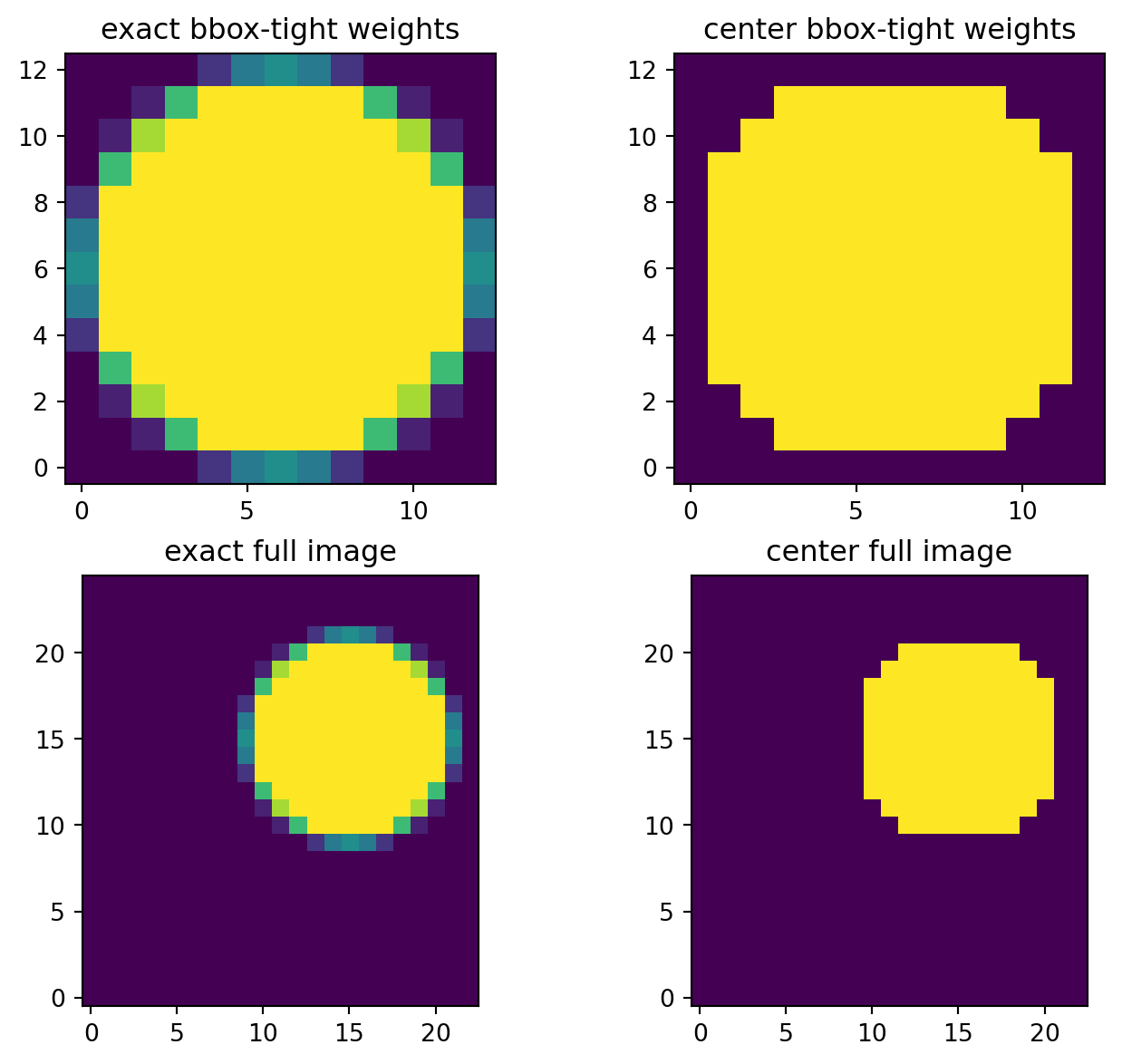
Build a boolean exclusion mask
No special helper is needed. Compare the image-shaped weights with a threshold. For exact masks, > 0 means any positive overlap. For center masks, > 0 means the pixel center was selected.
cosmicrayhit = aap.RectAp((10.0, 15.0), w=2.0, h=5.25, theta=np.pi/4)
cr_weights = cosmicrayhit.weights_exact()[0]
cr_bbox = cosmicrayhit.bboxes()[0]
bpm_cr = cr_bbox.to_image(cr_weights, shape) > 0.1  # bad pixel mask: >10% overlap
print(f"Num. of pixels flagged as bad: {bpm_cr.sum()}")
print(f"Full exact weights of RectAp (npix): {cosmicrayhit.npix_exact(shape)}")

fig, ax = plt.subplots(figsize=(5, 4))
ax.imshow(exact_image, origin="lower", cmap="viridis", vmin=0, vmax=1)
ax.imshow(bpm_cr, origin="lower", cmap="gray_r", vmin=0, vmax=1, alpha=0.5)
cosmicrayhit.plot(ax=ax, color="r", lw=1.5)
ax.set_title("CR-hit mask (weights > 0.1)")
plt.show()
Num. of pixels flagged as bad: 13
Full exact weights of RectAp (npix): 10.5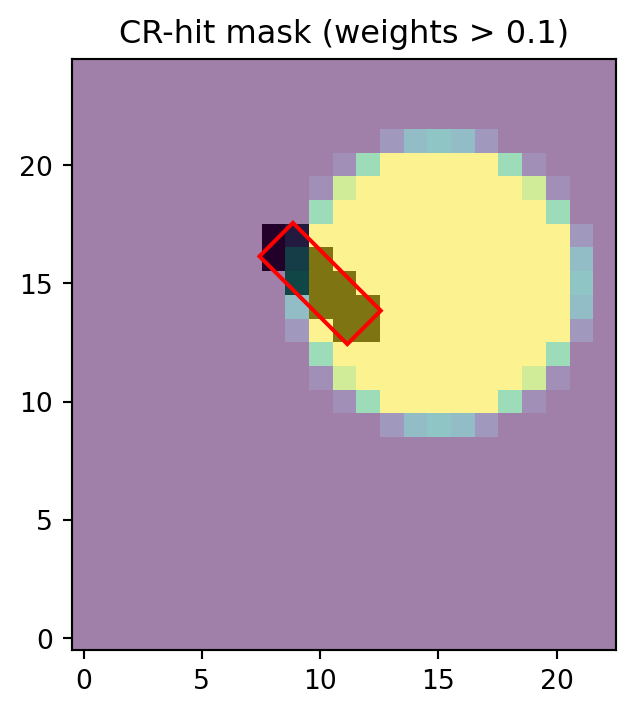
The threshold is part of your data-quality rule, not part of aperture aperture summation. A cosmic-ray mask, saturation mask, or detector-footprint mask may choose different thresholds.
Values and cutouts
Aperture objects expose two 1-D value extractors:
sampled_values(data)returns raw image values selected by positiveweights_center()pixels; it does not return the weights.weighted_values()returns exact fractional-overlap values, already multiplied by their weights.
Both return a list[np.ndarray], even for scalar apertures. Use flat=True to get a single concatenated 1-D array and integer offsets for high-throughput ragged reductions. sampled_cutout() and weighted_cutout() return bbox-tight 2-D cutouts as lists; they do not have a flat mode because flattening would discard spatial layout.
sampled = ap.sampled_values(np.ones(shape))
weighted = ap.weighted_values(np.ones(shape))
flat_weighted, offsets = ap.weighted_values(np.ones(shape), flat=True)

assert np.allclose(np.split(flat_weighted, offsets[1:-1])[0], weighted[0])
len(sampled), weighted[0].sum(), offsets
(1, np.float64(113.09733552923257), array([ 0, 137]))At the lower BoundingBox layer, weighted_cutout() preserves the bbox shape. Masked cutout pixels and off-image pixels use fill_value, which defaults to np.nan. weighted_values() returns the positive-weight values for explicit raw weights passed by the caller.
This lower-level BoundingBox.weighted_values(weights_center, data) pattern is equivalent to object-level sampled_values(data) only when the supplied weights are center weights, because those weights are binary.
Built-in aperture weights use float64. If you pass your own raw weights to BoundingBox methods, float32 and float64 are preserved, but other numeric or boolean dtypes are converted to float64. That includes float128 or longdouble arrays on platforms where NumPy provides them.
cutout = bbox.weighted_cutout(weights_exact, np.ones(shape))
values_exact = bbox.weighted_values(weights_exact, np.ones(shape))
center_values = bbox.weighted_values(weights_center, np.ones(shape))

cutout.shape, values_exact.sum(), center_values.size
((13, 13), np.float64(113.09733552923257), 109)With real data, the same helper returns data * weights on the bbox grid. The result is still bbox-tight, not a full-frame image.
demo_image = np.arange(np.prod(shape), dtype=float).reshape(shape)
demo_cutout = bbox.weighted_cutout(weights_exact, demo_image)
assert demo_cutout.shape == bbox.shape

fig, axes = plt.subplots(1, 2, figsize=(7, 3), constrained_layout=True)
im0 = axes[0].imshow(demo_image, origin="lower", cmap="gray")
axes[0].set_title("full demo image")
fig.colorbar(im0, ax=axes[0], fraction=0.046)

im1 = axes[1].imshow(demo_cutout, origin="lower", cmap="viridis")
axes[1].set_title("bbox-tight weighted_cutout")
fig.colorbar(im1, ax=axes[1], fraction=0.046)
plt.show()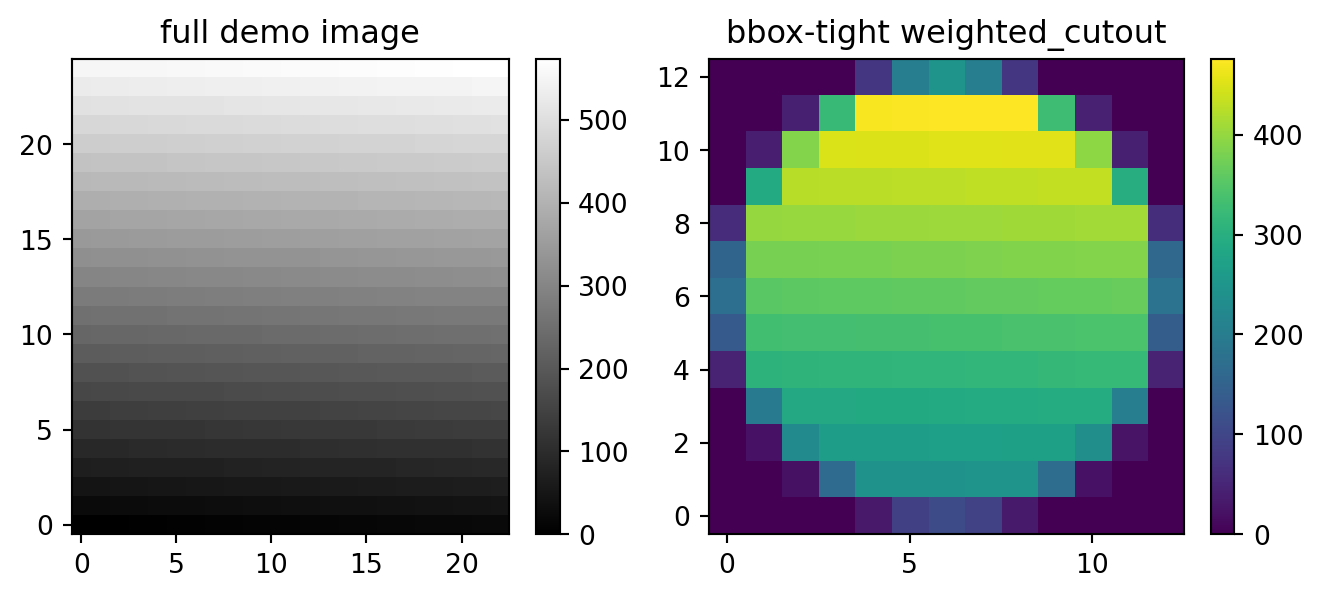
Maximum Performance
Import the raw Rust extension as aapr when the coordinates and image are already C-contiguous arrays. The raw functions return plain lists/tuples, not BoundingBox objects. For more raw-call examples, inspect astroapers.kernels.
import astroapers._rust as aapr

image = np.ascontiguousarray(np.ones(shape), dtype=np.float64)
xpos = np.ascontiguousarray([15.0], dtype=np.float64)
ypos = np.ascontiguousarray([15.0], dtype=np.float64)

raw_apsum, raw_npix = aapr.apsum_circ_exact(image, xpos, ypos, 6.0)
raw_npix_only = aapr.npix_circ_exact(xpos, ypos, 6.0, *shape)
raw_weights, ixmins, ixmaxs, iymins, iymaxs = aapr.weights_circ_exact(
    xpos,
    ypos,
    6.0,
)

raw_shape = (iymaxs[0] - iymins[0], ixmaxs[0] - ixmins[0])
raw_weights0 = np.asarray(raw_weights[0], dtype=np.float64).reshape(raw_shape)

assert np.allclose(raw_apsum[0], bbox.apsum(weights_exact, image)[0])
assert np.allclose(raw_npix[0], bbox.npix(weights_exact, shape))
assert np.allclose(raw_npix_only[0], raw_npix[0])

raw_apsum[0], raw_npix[0], raw_weights0.sum()
(113.09733552923252, 113.09733552923255, np.float64(113.09733552923255))